As the U.S. Mint phases out production of the penny, managing cash transactions efficiently is more important than ever. The Automated Cash Rounding feature allows SPOT to automatically round cash payments to the nearest nickel (or other increment), ensuring your drawer balances perfectly without the need for manual calculations at the counter.
Configuration
.png)
From the main SPOT menu, navigate to Setup > Program Configuration > Store Settings.
From the tree view on the left-hand pane, select Cashier Settings.
Rounding Settings
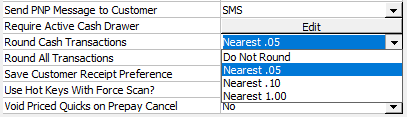
Scroll down to the setting labeled Round Cash Transactions. This setting determines how the system calculates the "Total Due" when a customer is paying with physical currency.
Rounding Options
Do Not Round: (Default) The system will ask for the exact penny amount.
Nearest .05: (Recommended) Rounds the total to the nearest nickel. This is the standard "even rounding" method for U.S. currency.
Nearest .10: Rounds the total to the nearest dime.
Nearest 1.00: Rounds the total to the nearest whole dollar.
Important: This logic only applies when "Cash" is selected as the payment method. Credit Cards, Checks, and On Account charges will always process the exact invoice total.
Once you have selected your desired rounding interval, click the Save button to apply changes.
Accounting & Balancing
When rounding is enabled, the amount collected at the counter will differ slightly from the invoice total. To ensure your end-of-day reports balance correctly, SPOT automatically handles this variance in the background.
How Variance is Handled
The system utilizes automatic Payin and Payout transactions to account for the difference.
Rounding Down (Payout): If an invoice of $10.02 is rounded down to $10.00, the system creates a $0.02 Payout to balance the missing revenue.
Rounding Up (Payin): If an invoice of $10.03 is rounded up to $10.05, the system creates a $0.02 Payin to account for the extra revenue.
These adjustments do not affect the tax calculated on the invoice. Tax is always calculated and remitted based on the original subtotal, ensuring full compliance.