The following settings are most commonly used. It is highly recommended that you review these settings in order to streamline your A/R operations.
In the SPOT application go to:
Setup > Program Configuration > Company > A/R Settings
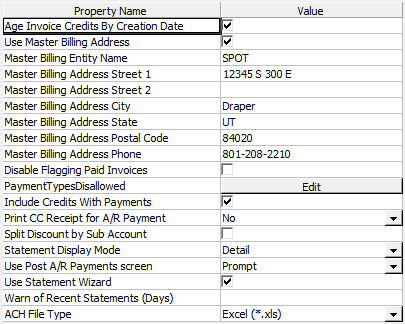
PaymentTypesDisallowed: Identify which payment types (such as 'Cash', 'Check', or 'Credit Card') are NOT allowed for A/R Payments. This setting is enforced at all locations.
Print CC Receipt for A/R Payment: Select this to print a Credit Card Receipt when an A/R payment is made by credit card.
Statement Display mode: Choose an option below:
Detail: All activity (i.e., invoices and adjustments) for the master and/or sub accounts will be displayed on the statement.
Summary: Only one summary line will be displayed under the master/sub account name.
Use Statement Wizard: Choose an option below:
Yes: Yes is selected by default. The Statement Wizard will be invoked automatically when the Statements screen is entered.
No: The Statement Wizard will not be invoked automatically.